Build Your Own AI Assistant at Work with Lark, n8n and a Few APIs
Alek Nur Fatman · 2 min read
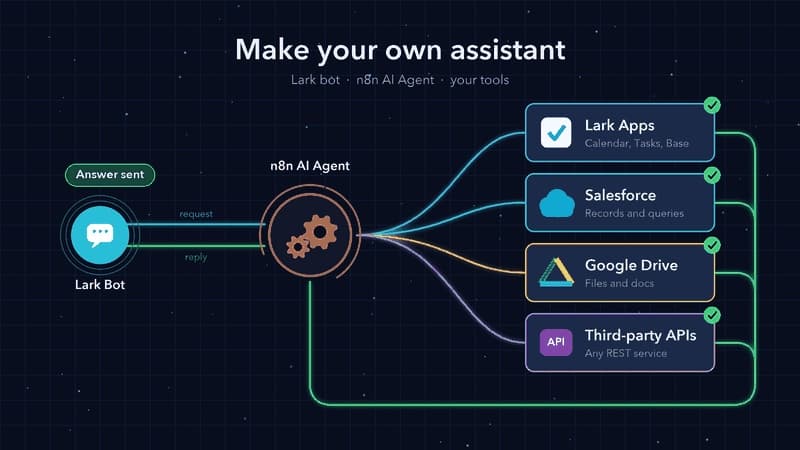
You don't need a massive enterprise platform to build your own AI assistant at work. A custom Lark bot, n8n, and a few API connections are all it takes. Here's the architecture of what I recently built.
The architecture
The Lark bot is the frontend. It receives DMs and group mentions, and replies directly in the same chat, even handling interactive approval cards.
n8n is the brain. An AI Agent workflow processes the intent and decides exactly what to do with each message.
The tools are Lark apps (Calendar, Tasks, Base), Salesforce, and anything else n8n can reach. Google Drive and other third-party apps are just one node away.
You just ask in plain language. The agent picks the right tool, calls the API, and answers where you asked.
The moment it clicked
The moment that made me realize "this actually works" was when I casually messaged the bot to pull a specific Leads status from Salesforce and log the update directly into my project tracker in Lark Base. It executed perfectly in seconds, without me ever leaving the chat.
Three lessons so far
Start read-only. Give your agent write access only after you fully trust its prompts and routing logic.
Keep parameter descriptions identical everywhere. One duplicated $fromAI key with two slightly different descriptions took my entire agent down for about a day.
Handle message types early. Lark voice messages, for example, arrive as rich text, not plain text. My first parser read them as empty before I caught the formatting quirk.
Are you experimenting with n8n agents too? I'm always curious what others are building.